

TL;DR
- An in-app purchase app sells digital content, features, or access inside the app through store billing.
- Games, content subscriptions, freemium utilities, and learning apps all use in-app purchases in different shapes.
- Match the purchase type to what the customer keeps, uses up, or receives over time.
- Buying, restoring a purchase, cancelling, and recovering a failed renewal are separate events with separate flows.
- Store rules decide which digital sales must go through Apple or Google billing, so read them before changing anything.
- Track the entitlement as well as the checkout so a completed payment results in access the customer can use.
An in-app purchase app is an app that sells things from inside itself. The download is often free. The revenue arrives later, when a customer pays for extra content, a feature unlock, or ongoing access to a premium tier.
For the customer, that moment looks like a paywall or an in-game store. They pick an offer, confirm it through the store, and return to the app with the new access. For the team behind the app, each offer is a promise about what the customer now owns, and the app has to honor that promise every time they open it.
What does “in-app purchase app” mean?
The phrase describes a business model, not a store category. Any app that sells digital content, functionality, or access through Apple or Google billing fits the label. That includes a game selling extra lives, a journaling app selling a yearly plan, and a photo editor selling a permanent pro unlock.
Apple documents the available product types in In-App Purchase. Google Play documents its side in the Play billing documentation. For background on the purchase itself, read what in-app purchases are.
Physical goods ordered through an app sit outside this definition. A pair of shoes bought in a retail app is e-commerce, not an in-app purchase. The term covers digital value consumed or unlocked inside the app.
Which apps use in-app purchases?
Many free apps use in-app purchases. The shape of the offer changes by category, while other free apps rely on ads, physical commerce, or another revenue model. For the broader choice between those models, see app monetization.
| App category | What customers buy | Common purchase shape |
|---|---|---|
| Games | currency, extra lives, season passes, cosmetic items | consumables, fixed-term passes, subscriptions |
| Video, music, and reading apps | ongoing access to a catalogue | auto-renewable subscriptions |
| Health, fitness, and learning apps | training plans, courses, premium programs | auto-renewable subscriptions, fixed-term passes |
| Productivity and utility apps | pro tiers, extra storage or exports, permanent unlocks | subscriptions, one-time unlocks |
| Dating and social apps | visibility boosts, extra messages, premium filters | consumables, subscriptions |
A game sells units a player spends. A meditation or fitness app sells access measured in weeks and months. A photo editor might sell both at once: a subscription for new filters plus a one-off unlock for the core toolset. Match the model to the promise on the purchase screen rather than copying whatever a neighboring category does.
How do in-app purchase apps make money?
On Apple platforms the money arrives in four shapes. Each one sets a different expectation about what the customer keeps.
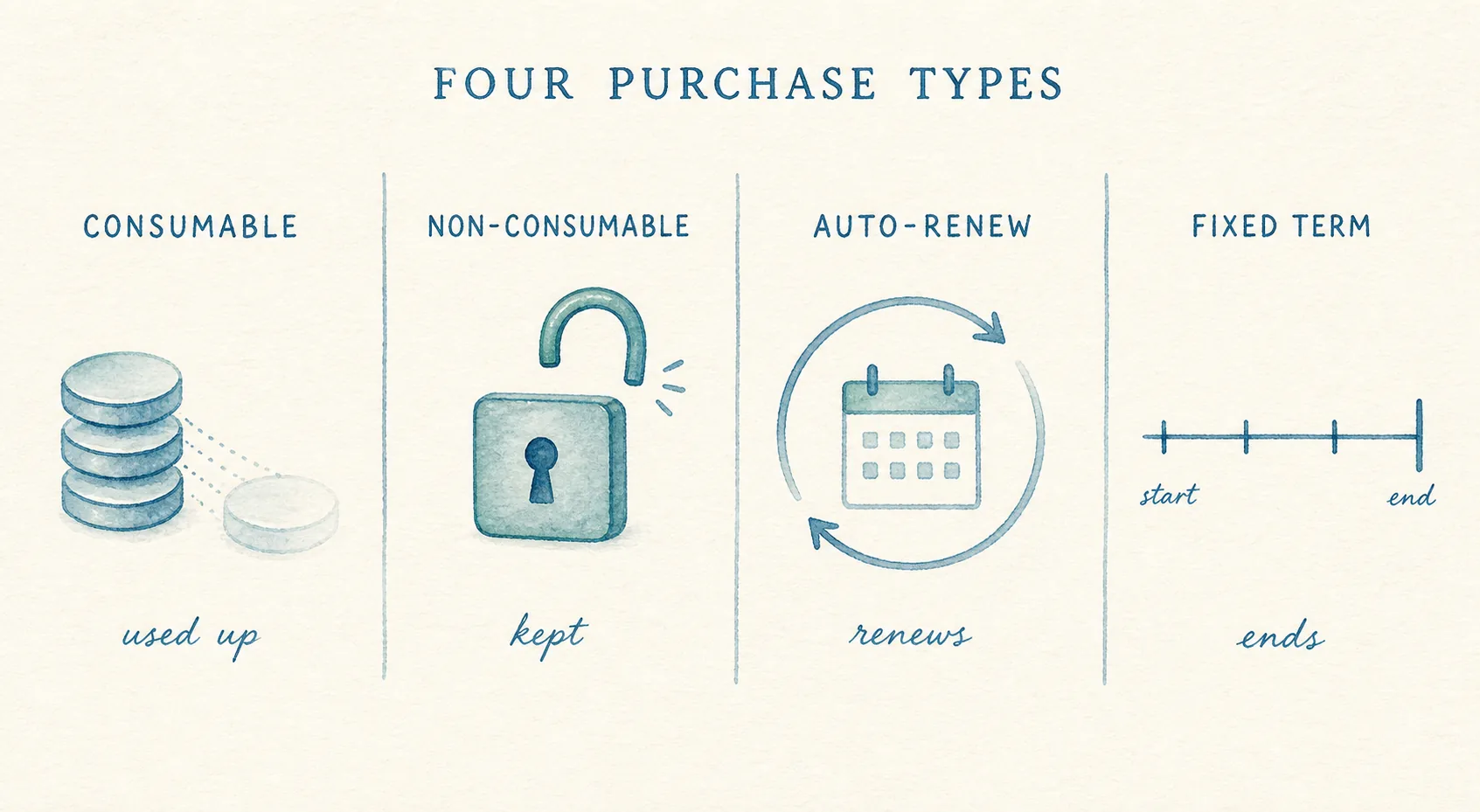
| Model | How the customer pays | What the team owes them |
|---|---|---|
| Consumable | pays per unit, again and again | a balance that updates reliably after every purchase |
| Non-consumable | pays once | permanent access that survives reinstalls and new devices |
| Auto-renewable subscription | pays on a schedule until they cancel | access that follows the current renewal state |
| Non-renewing subscription | pays for a fixed period | access with a clear end date and a path to buy again |
A common approach is a freemium loop around those models. A free tier earns attention and daily habit. The paywall converts part of the audience to paid. The free tier has to be good enough to keep people around and limited enough that the paid tier means something. If the balance slips, inspect both the paywall and what the free tier already gives away.
Subscriptions carry the recurring revenue for content and coaching apps. Consumables carry it for games. Many apps combine models, and that is fine as long as each offer maps to one product type with one clear promise.
What is the difference between buying, restoring, cancelling, and recovering a failed payment?
These events touch the same customer account, but they answer different questions. Mixing them up is a common source of support tickets for in-app purchase apps.
| Event | What happened | Where to read more |
|---|---|---|
| Purchase | the customer starts a new transaction for access or content | what in-app purchases are |
| Restore | the customer asks the store to refresh a past transaction, with no new charge | what Restore Purchase means |
| Cancellation | the customer stops a subscription from renewing | subscription cancellation reasons |
| Failed renewal | a recurring payment did not collect, so access lapsed without a decision to leave | failed payment recovery for subscription apps |
A Restore Purchase button reconnects access the customer already paid for. It cannot renew an expired plan or fix a declined card. A cancellation flow cannot save a subscription that ended because billing failed. Keep the four paths separate in both the interface and the analytics, or the team will chase the wrong fix.
What store rules apply to in-app purchase apps?
On Apple platforms, App Review Guideline 3.1.1 requires apps that unlock digital features or content to use in-app purchase. It also calls for a restore mechanism covering restorable purchases. Read it alongside the StoreKit documentation while designing the flow, not after a rejection arrives.
Google Play sets its own billing requirements for digital goods sold inside apps distributed through the store. Start with the Google Play billing documentation before assuming a web checkout or third-party processor can stand in for store billing.
Treat policy as a design input. The purchase screen, the restore control, and the subscription management path all need to satisfy the store before they can satisfy the customer.
What should app teams track?
Checkout numbers show demand. They cannot show whether the customer reached the feature they paid for. An in-app purchase app needs both sides of that picture.
| Signal | What it tells the team |
|---|---|
| Paywall views and purchase attempts | demand for the offer |
| Store transaction result | whether the store completed the charge |
| Entitlement grants and denials | whether paid access actually opened |
| Renewal state and expiry | who should still have access |
| Cancellation reasons | why subscribers chose to leave |
| Restore attempts | returning customers who cannot find access they bought |
| Failed renewals and recovery | revenue lost to billing problems rather than choice |
| Support contacts after purchase | where the flow confuses people |
Cancellation data deserves its own taxonomy. Apple reports reasons such as Canceled and Billing Issue as distinct states, and the subscription cancellation reasons guide covers how to separate them. Payment failures belong in a recovery system, described in failed payment recovery for subscription apps, not in a save-offer flow.
This is where app data tends to split. The store or billing platform holds the transaction. Product analytics holds the paywall and feature use. Support holds the confused customer. Looking at only one of the three can make a broken entitlement flow look like weak conversion.
Refix is built to bring product, subscription, and support signals together, so a team can trace the gap between a completed purchase and the access the customer expected.
In-app purchase app checklist
Walk through the experience from the customer side before each release.
- State the offer and the access period plainly before purchase.
- Match the store product type to the promise made in the app.
- Verify the completed transaction before granting access.
- Update the interface as soon as access changes.
- Place restore controls where a returning customer can find them.
- Test a new purchase, reinstall, new device, cancellation, expiry, and failed renewal as separate journeys.
- Review current store policy and implementation documentation before changing billing behavior.
The purchase button is only the first event. A reliable in-app purchase app keeps the store state, the product access, and the customer understanding aligned after it.
See how Refix connects product and subscription signals.
FAQ
- What is an in-app purchase app?
- It is an app that sells digital content, features, or access from inside itself through the store's payment system. The download is often free, and revenue comes from purchases such as premium tiers, subscriptions, feature unlocks, or game items.
- Which types of apps use in-app purchases?
- Games, streaming and reading apps, health and learning apps, productivity utilities, and dating or social apps all use them. Each category sells a different promise, from units a player spends to access that renews on a schedule.
- How do in-app purchase apps make money?
- They sell consumables that get used up, one-time unlocks that stay available, auto-renewable subscriptions, or fixed-term passes. Most run a freemium loop where a free tier earns attention and the paywall converts part of the audience to paid.
- Do in-app purchase apps include subscriptions?
- Yes. An auto-renewable subscription is one of the in-app purchase types. Many content, fitness, and learning apps earn most of their revenue from subscriptions sold this way.