


TL;DR
- A Claude connector lets Claude read live data from a tool you already use. Choose by where the data lives, because a connector reads only its own source.
- Many data connectors can write as well as read. Check the vendor docs and limit the connector to read access before you use it for analysis.
- Warehouse connectors give Claude SQL access. Semantic-layer and BI connectors give it your metric definitions, which makes answers more consistent.
- PostHog, Amplitude, Mixpanel and Stripe each run their own connector. Google's official Google Analytics server runs only on your own machine.
- You can analyze an uploaded CSV or Excel file in Claude with no connector at all.
- Refix runs the investigation itself across product analytics, billing and warehouse data. We make Refix, so weigh that.
A Claude connector lets Claude read live data from a tool you already use, such as a warehouse, a product analytics tool, or Stripe. The best Claude connectors for data analysis are the ones that reach the place your data lives, with only the access the work needs. This list groups them that way.
The short version: use your warehouse’s own connector (Snowflake, BigQuery or Databricks) for SQL, dbt or Hex for defined metrics, PostHog, Amplitude or Mixpanel for product usage, and Stripe for billing. When one question crosses several of those sources, use Refix, which runs the investigation across them.
Disclosure: Refix makes one of the connectors listed here, in its own group near the end. If we got something wrong about your product, tell us and we will fix it.
Most “best Claude connectors” lists cover every kind of tool, from Google Drive to Figma, and give data one short section. Few of them say what a connector is allowed to change. So this list states two things for each connector: what it reads, and whether it can write.
Every fact here comes from the vendor’s own documentation, opened in November 2026, and each entry links to it. We did not check vendor prices, so the table leaves prices out. Connectors change often. Re-check the docs before you rely on a detail.
Our picks by need
- If your data is in Snowflake, BigQuery or Databricks: that platform’s own connector.
- If your team already defines metrics in dbt: the dbt connector.
- If your analysts work in notebooks: Hex.
- If your team runs Metabase: the Metabase connector.
- If every question is about product usage: the PostHog, Amplitude or Mixpanel connector, whichever tool you use.
- If the question is about payments and subscriptions: Stripe.
- If you need ad and marketing data without a warehouse: Coupler.io or Windsor.ai.
- If you have one spreadsheet to analyze today: no connector. Upload the file.
- If one question needs product, billing and warehouse data together, and you want the investigation done for you: Refix.
What does each Claude connector read, and can it write?
“In directory” means the connector is listed in Claude’s connector directory. “Custom” means you add it yourself with a server URL. “Can write” means the vendor docs describe at least one tool that changes data, content or settings.
| Connector | In directory | What it reads | Can write | Good to know |
|---|---|---|---|---|
| Snowflake | Yes | Snowflake data through Cortex tools and SQL | Only if an admin allows it | SQL tool is read-only by default |
| BigQuery | Yes | BigQuery datasets and tables | Yes, through execute_sql; a read-only tool exists |
Results capped at 3,000 rows |
| Databricks Genie | Yes | Lakehouse data through Genie | Not stated | Old Beta endpoint stops November 30, 2026 |
| MotherDuck | Yes | MotherDuck databases | Yes, read-only option exists | Results pass through the remote server |
| ClickHouse | Yes | ClickHouse Cloud services | No, SELECT only | Enabled per service |
| dbt | Yes | Models, lineage, Semantic Layer metrics | Yes, can run jobs | Tools depend on your dbt plan |
| Hex | Yes | Hex projects and connected data | Yes, for Editors | Hex Team and Enterprise plans |
| Omni | Yes | Omni semantic model | Dashboards, routines and apps | Default 500 rows, cap 10,000 |
| ThoughtSpot Spotter | Yes | Answers, Liveboards, semantic layer | Yes | Sold as an add-on |
| Metabase | Yes | Tables, metrics, questions | Yes, creates content | On every Metabase plan |
| Looker | Custom | LookML models | Depends on enabled tools | Looker-hosted instances only |
| PostHog | Yes | PostHog product data | Yes, read-only option exists | Hosted endpoint is free |
| Amplitude | Yes | Charts, cohorts, experiments | Yes, with a write permission | Service accounts are Enterprise only |
| Mixpanel | Yes | Events, funnels, retention | Yes | 600 requests per hour per user |
| Stripe | Yes | Payments, subscriptions, billing | Yes, unless you grant read only | Server is in public preview |
| Coupler.io | Yes | Data sets from your Coupler data flows | Rows no, configuration yes | One query reads one data set |
| Windsor.ai | Yes | 350+ ad, analytics and social platforms | Yes, asks before each change | Connect a source in Windsor first |
| Refix | Yes | PostHog, Mixpanel, Amplitude, Google Analytics, BigQuery, Snowflake, PostgreSQL, Stripe, Salesforce, HubSpot | No | Runs the investigation; needs a paid workspace |
What do you need before you add a data connector to Claude?
Four things decide whether a connector will work for you.
Your Claude plan. Anthropic says directory connectors are available to all users. Custom connectors work on Free, Pro, Max, Ultra, Team and Enterprise, and Free users get one. A custom connector must point at a server on the public internet, because Claude connects from Anthropic’s cloud.
Your admin. On Team and Enterprise, an Owner must turn each connector on for the organization. Each person then signs in on their own. Owners can set each tool to “Always allow”, “Needs approval” or “Blocked”. For data analysis, that is the place to allow reads and block writes.
The tool’s own setup. Snowflake, Databricks, dbt, Metabase and Looker have no single address. Each connector points at your own account or instance, and an admin on that side has to enable it first.
Where the results go. A connector sends query results into your Claude conversation so Claude can read them. If a table holds personal or regulated data, decide whether it belongs there before you connect it.
Which Claude connectors work on a data warehouse?
A warehouse connector gives Claude SQL access to your tables. That is the most flexible option and the one that needs the most care. Claude writes the query, so the answer is only as good as its guess about what each table and column means.
Snowflake
Snowflake’s managed MCP server serves Cortex Analyst, Cortex Search, Cortex Agents, custom tools and SQL execution to Claude. Access follows the Snowflake role, and the default sign-in is Snowflake OAuth. The SQL tool allows only SELECT queries unless an admin turns its read_only setting off.
Best fit: Snowflake teams that already have semantic views. Not ideal if: nobody can do the admin setup. Someone must create the MCP server object in your account first, and Cortex Analyst works with semantic views only. A server holds at most 50 tools, and SQL responses are cut off at 250 KB.
BigQuery
Google’s BigQuery MCP server has a fixed address and six tools: four that list and describe datasets and tables, execute_sql, and execute_sql_readonly. Sign-in is Google OAuth with your IAM roles.
Best fit: Google Cloud teams that want Claude to explore tables and run queries. Not ideal if: you need large result sets or long queries. Results are capped at 3,000 rows, and a query is cancelled after three minutes. On access: execute_sql can change data, execute_sql_readonly cannot, and an admin can block execute_sql with a deny policy.
Databricks Genie
The Databricks entry in Claude’s directory is Genie, not a general SQL connector. Claude sends a question, and Genie writes the SQL and returns an answer with links to its sources. Unity Catalog permissions apply.
Best fit: Databricks teams that already use Genie. Not ideal if: you want Claude to write the SQL itself. Genie writes it, and very large results are cut short. If you set this up on the old Beta endpoint, move to the new one. Databricks says the old endpoint stops on November 30, 2026.
MotherDuck
MotherDuck’s connector runs SQL and explores schemas. It also works with Dives, which are saved interactive visualizations, and Guides, which hold metric definitions. The docs list both read-only and read-write tools, with a way to restrict to read-only.
Best fit: small teams on DuckDB and MotherDuck that want fast answers on modest data. Not ideal if: data residency rules are strict. Query results pass through MotherDuck’s remote server, and local DuckDB files need the local server.
ClickHouse
ClickHouse Cloud’s remote MCP server is the one warehouse connector here that its vendor describes as read-only: scoped SELECT queries. You enable it per service.
Best fit: teams with event data in ClickHouse Cloud that want Claude to read and nothing more. Not ideal if: you self-host ClickHouse. The remote server is a ClickHouse Cloud feature.
If your data sits in a Postgres database on Supabase, the Supabase connector is also in the directory. It is built for developers and can change schemas, so add read_only=true to the server address when you use it for analysis.
Which Claude connectors use a semantic layer or BI tool?
These connectors sit on top of the warehouse. Claude asks for a metric that someone on your team has already defined, so “revenue” means the same thing each time. You need that modeling work done before the connector helps.
dbt
The dbt remote MCP server gives Claude your models, sources, lineage and Semantic Layer metrics, plus SQL tools. It is on all dbt platform plans, and the tools you get depend on the plan.
Best fit: teams that already keep their metric definitions in dbt. Not ideal if: you have no dbt project or Semantic Layer yet. On access: the tool list includes a tool that triggers job runs, so check permissions. With token-based sign-in, execute_sql is not available, per the setup guide.
Hex
The Hex connector searches your Hex projects and runs the Hex Threads agent, and charts show inside Claude. People with the Editor role can also create and edit notebook cells from Claude.
Best fit: data teams whose analysis already lives in Hex. Not ideal if: you are on a lower Hex plan. Hex says the connector is available on Team and Enterprise. Chart widgets in Claude expire after 24 hours.
Omni
Omni’s connector answers questions through the Omni semantic model. Claude picks a model and a topic, then gets the data. Per the tool reference, it refuses raw SQL. It can create dashboards, and edits to an existing dashboard land in a draft.
Best fit: teams that want Claude limited to governed topics. Not ideal if: you need large result sets. Results default to 500 rows and cap at 10,000, and an Omni admin must turn the server on.
ThoughtSpot Spotter
The ThoughtSpot connector answers natural-language questions, reads the data behind Answers and Liveboards, and respects row-level security. It can also create Liveboards and edit data models.
Best fit: larger companies already on ThoughtSpot. Not ideal if: you want to try it without a sales call. ThoughtSpot sells it as an add-on to Enterprise Edition and ThoughtSpot Embedded.
Metabase
The Metabase MCP server runs inside your own Metabase. Claude can search tables and metrics, run queries, return charts, and create questions and dashboards. Metabase says it is available on every plan.
Best fit: teams that run Metabase and want Claude to answer from the same saved metrics. Not ideal if: you need per-group control of tools on a lower plan. That control needs Pro or Enterprise, and an admin must turn the server on.
Looker
Looker has a Looker-managed MCP server. Google’s release notes say it became generally available on October 26, 2026. We did not find it in Claude’s public directory, so you add it as a custom connector with your instance address. All tools are off until a Looker admin enables them.
Best fit: Looker-hosted teams with LookML models in place. Not ideal if: your Looker is customer-hosted, which needs a self-run server instead.
Which Claude connectors read product analytics data?
If your events already live in PostHog, Amplitude or Mixpanel, that tool’s own connector is the shortest path. Each one reads its own tool and nothing else. When the answer also needs billing or warehouse data, see Refix below. If you are still choosing the analytics tool itself, mobile app analytics covers the options.
PostHog
The PostHog connector runs HogQL or natural-language queries and covers insights, dashboards, feature flags, experiments, surveys and error tracking. PostHog calls it a free, hosted endpoint, and says some AI-powered tools may be billed as PostHog AI spend.
Best fit: product engineers who work in PostHog every day. Not ideal if: you want analysis with no risk of change. The docs say the agent can read and write across PostHog’s products, so apply the read-only restriction. The PostHog MCP FAQ gives rate limits of 480 requests per minute and 4,800 per hour for each credential.
Amplitude
The Amplitude connector covers charts, dashboards, notebooks, experiments, cohorts and session replay, with segmentation, funnel and retention queries.
Best fit: product and growth teams that run on Amplitude. Not ideal if: you need a shared service account below the Enterprise plan. Amplitude limits service account sign-in to Enterprise. Write calls need a separate permission, so leave that off for analysis.
Mixpanel
The Mixpanel connector runs segmentation, funnel and retention queries and reads your event definitions, session replays and dashboards.
Best fit: Mixpanel teams that want funnel and retention answers in a chat. Not ideal if: your questions depend on cohorts. The query tool cannot filter or break down by cohort. Mixpanel’s docs say the assistant can both read and write. An org admin must enable the connector, unless your free or growth account was created after August 1, 2026. The limit is 600 requests per hour per user.
Which Claude connector reads billing and revenue data?
Stripe
The Stripe connector reads Stripe objects and a balance summary. A second tool, stripe_analytics, queries metrics, subscriptions and financial reports. Stripe labels the MCP server a public preview.
Best fit: founders and finance leads who want revenue and subscription answers from the source of truth. Not ideal if: your questions go beyond Stripe, such as which product behavior comes before a cancellation. Refix reads Stripe together with product analytics for that kind of question. On access: the connector can also create, update and delete through the Stripe API. For analysis, Stripe’s docs say to grant only the Data read permissions. Stripe says the Queries API is free through January 31, 2027, with usage-based pricing after that.
Which Claude connectors bring in marketing and SaaS data?
Google Analytics has no documented official connector for the Claude web app. Google’s own Google Analytics MCP server is read-only and runs on your own machine. These two services fill that gap, and they pull ad and CRM sources into the same connector.
Coupler.io
Coupler.io lets Claude run SQL on the data sets your Coupler data flows produce, from ad, CRM and finance sources. Claude cannot edit or delete the rows.
Best fit: marketing teams that already move data with Coupler. Not ideal if: you expect it to be fully read-only. The docs say Claude can change your Coupler configuration, such as data flows and schedules. One query reads one data set. Coupler also has a troubleshooting page for a reported case where the directory connector’s tools fail to load on Claude Free and Pro. The workaround is the custom connector.
Windsor.ai
Windsor.ai connects Claude to more than 350 platforms. Its directory listing names Meta Ads, Google Ads, Google Analytics, Google Search Console, YouTube, TikTok and LinkedIn.
Best fit: performance marketers who want cross-channel numbers in one chat. Not ideal if: you want a connector that cannot touch your ad accounts. Windsor says it reads and writes to connected accounts. The directory listing says Claude asks you to confirm each change, and new campaigns are created paused.
Can Claude analyze data without a connector?
Yes, and for a one-off question it is often the right choice. Upload a CSV or Excel file and Claude analyzes it with code. Anthropic says code execution and file creation are available on every plan, with a 30MB limit per file.
Anthropic also publishes a Data plugin with commands such as /analyze, /write-query and /build-dashboard. It works with a warehouse connection or with uploaded files.
The limit is freshness. A file is a snapshot. When the number changes tomorrow, you export and upload again.
Which Claude connector works across several data sources?
Some questions need two sources at once, such as product events in PostHog and payments in Stripe. You have three options. Connect both connectors and let Claude combine the results, which works for simple questions but leaves the join to Claude. Load both sources into a warehouse and use the warehouse connector. Or use a connector that reads several sources and runs the investigation itself.
Refix
Refix is a revenue-obsessed AI product manager, and its connector works differently from the others on this list. Most connectors hand Claude query tools for one source, and Claude plans the analysis. With Refix, Claude hands over the question. Refix chooses the relevant sources, tests the likely explanations, and returns the answer with its evidence.
One question can cover PostHog, Mixpanel, Amplitude, Google Analytics, BigQuery, Snowflake, PostgreSQL, Stripe, Salesforce and HubSpot, whichever of those you have connected to your Refix workspace. So “why did trial-to-paid conversion drop last month?” can follow the drop from product events into billing in one investigation.
The connector does three jobs:
- Investigate a question. Ask in your own words and read the result in Claude.
- Keep a goal moving. Create a watcher, such as “watch failed payments and tell me when a pattern needs attention”. It keeps checking and reports what it finds.
- Catch up. Ask what Refix found this week. Reading findings uses no credits.
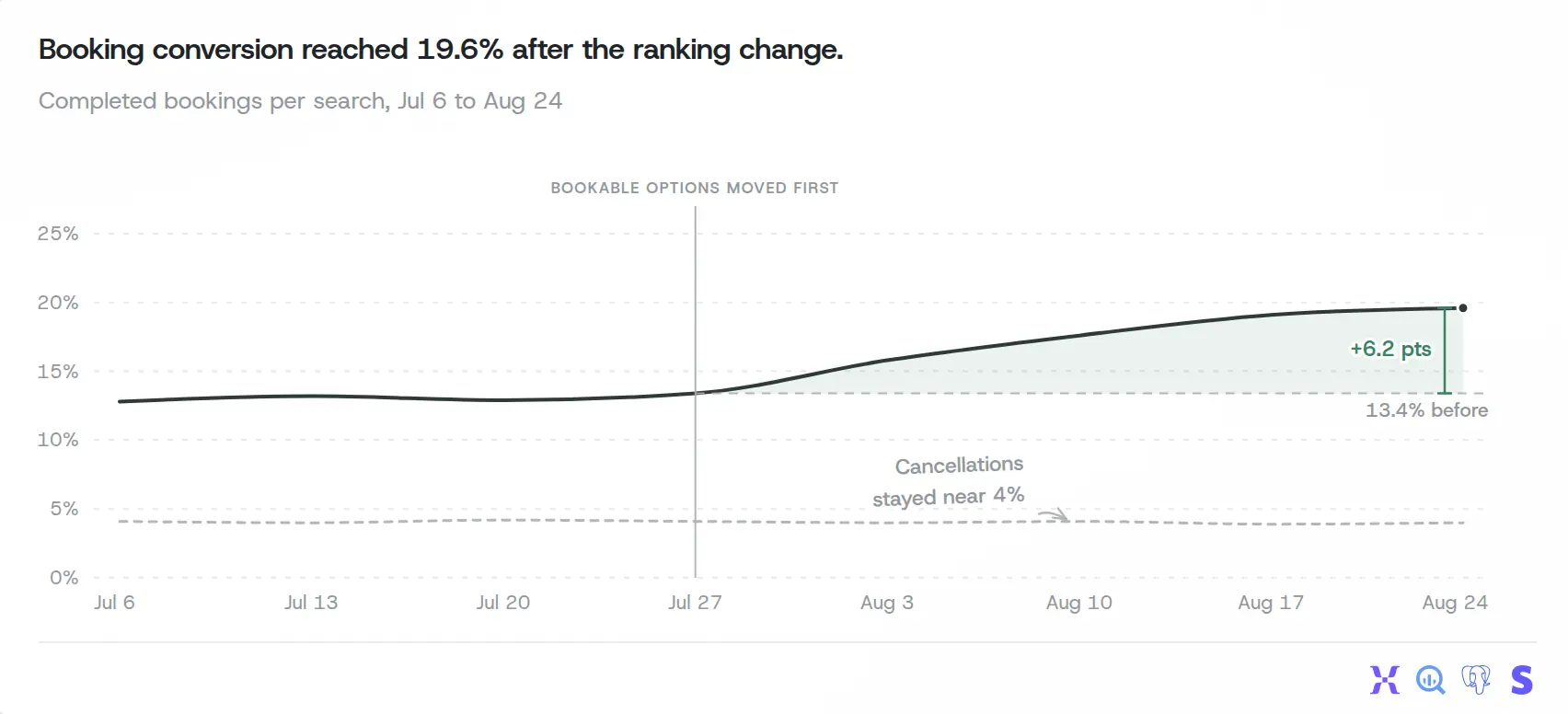
Refix findings include charts like this one.
The connection does not write to your connected sources. Sign-in is OAuth, with no API keys. A proposed action in a tool such as Linear or Jira needs a person to review it in Refix.
Best fit: consumer-facing businesses (apps, consumer websites, marketplaces and D2C brands) whose questions cross product, billing and CRM data, and that want an answer with evidence instead of a query to check.
Price: you need a Refix workspace. Pro is $150 per month for 150,000 credits, or $1,500 per year, per the Refix pricing page. Pro comes with a forward deployed PM, a Refix product manager who works alongside your team. The 14-day trial includes 70,000 credits and needs a card. Investigations and watchers use credits.
Not ideal if: you want to write and control the SQL yourself, which a warehouse connector does better. It also does not fit if you self-host Refix, because the connector works with Refix cloud workspaces only. One connection covers one workspace.
Alternatives to consider: your analytics tool’s own connector if every question lives there; the dbt or Metabase connector if you need governed metric definitions.
How do you choose a Claude connector or MCP server for data analysis?
Work through these checks in order.
- Where the data lives. A connector reads only its own source. Warehouse data points to Snowflake, BigQuery, Databricks, MotherDuck or ClickHouse. Product events point to PostHog, Amplitude or Mixpanel. Payments point to Stripe. Ad data points to Coupler.io or Windsor.ai. A question that crosses several of these points to a warehouse that already holds them all, or to Refix.
- Raw SQL or defined metrics. With raw SQL, Claude guesses what your columns mean. If your team has defined metrics in dbt, Omni, Metabase, ThoughtSpot or Looker, use that connector so answers match your dashboards.
- What it can write. Read the vendor’s tool list. Grant read permissions only, use the read-only setting where one exists, and on Team or Enterprise have an Owner block the write tools.
- Limits. Row caps and timeouts shape the answer. BigQuery returns at most 3,000 rows. Omni defaults to 500. If Claude summarizes a cut-off result, the total will be wrong.
- A number you already know. Before anyone relies on a connector, ask for a figure you have checked by hand, such as last month’s revenue. If the answer is wrong, find out why first.
If your team asks its questions in Slack more than in Claude, the best AI data analyst tools guide compares tools by where your data lives and whether they wait to be asked, and best Slack AI agents covers agents beyond data work.
FAQ
- What are the best Claude connectors for data analysis?
- It depends on where your data lives. For a warehouse, look at Snowflake, BigQuery, Databricks Genie, MotherDuck, and ClickHouse. For governed metrics, look at dbt, Hex, Omni, ThoughtSpot Spotter, Metabase, and Looker. For product analytics, use the PostHog, Amplitude, or Mixpanel connector. For billing, use Stripe. For ad and marketing data, look at Coupler.io and Windsor.ai. For a question that crosses product analytics, billing, and warehouse data, use Refix, which runs the investigation across them.
- What is a Claude connector?
- A connector links Claude to an outside tool so Claude can read its data or take actions in it. You add one from Claude's connector directory, or you add a custom connector with the URL of a remote MCP server. You then sign in to the tool and approve access.
- Is a Claude connector the same as an MCP server?
- Nearly. MCP is the protocol. A connector is a remote MCP server that Claude can reach over the internet. Some MCP servers run only on your own computer, such as Google's Google Analytics server, and those cannot be added as a connector in the Claude web app.
- Are Claude data connectors read-only?
- Many are not. As of November 2026, the vendor docs for BigQuery, PostHog, Amplitude, Mixpanel, Stripe, Hex, dbt, and Metabase all describe tools that can write or change something. Several also document a way to limit access to reads, and BigQuery has a separate read-only query tool. Snowflake's SQL tool is read-only unless an admin changes it. ClickHouse describes its connector as read-only SELECT queries, and Refix does not write to connected sources.
- Are Claude connectors free?
- Anthropic says directory connectors are available to all Claude users, and custom connectors work on every plan, with Free limited to one. The tool behind the connector may still cost money. For example, Hex offers its connector on Team and Enterprise plans, and ThoughtSpot sells its connector as an add-on. Warehouse queries use your normal warehouse compute.
- Can Claude connect to Google Analytics?
- Not through a documented official connector in the Claude web app, as of November 2026. Google's official Google Analytics MCP server is read-only and runs on your own machine. To reach Google Analytics data from the Claude web app, use a third-party connector such as Coupler.io or Windsor.ai, or a tool such as Refix that connects to Google Analytics itself.
- Can Claude analyze data without a connector?
- Yes. You can upload a CSV or Excel file and ask Claude to analyze it. Anthropic says code execution and file creation are available on every plan, with a 30MB limit per file. A file is a snapshot, so the answer does not change when the source data changes.
- How can I ask Claude about PostHog and Stripe data together?
- There are three ways. Connect both the PostHog and Stripe connectors and ask Claude to combine the results, which works for simple questions but leaves the join to Claude. Load both sources into a warehouse and use that warehouse's connector. Or use Refix, which reads PostHog, Stripe, and a warehouse through one connector and runs the investigation across them.
- How is Refix different from the other Claude connectors?
- Most connectors give Claude query tools for one source, and Claude plans the analysis. With Refix, Claude hands over the question and Refix runs the investigation across your connected product analytics, billing, CRM, and warehouse sources, then returns the answer with its evidence. It can also keep watching a goal and report findings later. It does not write to connected sources. It needs a Refix cloud workspace, and investigations use workspace credits.