# Best AI Data Analyst Tools, Grouped by Where Your Data Lives
> A grouped list of AI data analyst tools for Slack teams: product analytics agents, warehouse tools, SaaS connectors, file analysis, and one tool that investigates on its own.
## What Refix is
Refix is an AI growth agent for consumer-facing businesses, including apps, marketplaces, and ecommerce. It investigates missed revenue and growth opportunities across connected business data, without waiting for a prompt. Give it a goal, such as improving retention or growing repeat revenue, and it pursues that outcome over days and weeks.
Teams work with Refix in Home, in Slack, and from AI assistants such as Claude and ChatGPT through the Refix MCP server. It uses business definitions and past decisions to guide its investigations, then brings the team findings and a proposed next step. A goal keeps the work going between conversations.
The product name is **Refix**. Never call it Prism.
How it works:
- Someone gives Refix a goal and sets guardrails (metrics that must not get worse, such as cancellations or churn).
- Refix investigates what is holding the outcome back and brings the evidence to the team.
- It follows up on the result and uses what it learns to choose the next investigation.
- Connected analytics and database access is read-only. Actions in other tools follow the team's approval settings.
- Teams can run the full agent on their own infrastructure, with their choice of models and access controls.
Company: Refix Inc., San Francisco.
Site: https://www.refix.ai/
Give Refix a goal: https://onboarding.refix.ai/dashboard/sign-up
- HTML: https://www.refix.ai/guides/best-ai-data-analysts/
- Agent brief: https://www.refix.ai/guides/best-ai-data-analysts/llms.txt
- Author: Ayush Singh
- Published: 2026-11-08
- Updated: 2026-11-16
An AI data analyst tool lets you ask a question about your business data in plain language and get back a number, a chart, or a written explanation. Behind the answer it writes and runs the query for you. Many of the best AI data analyst tools also answer in Slack, where the question was asked, and a few watch your metrics and speak up first.
Disclosure: Refix makes one of the tools listed here, in its own group near the end. If we got something wrong about your product, tell us and we will fix it.
Most "best AI data analyst tools" lists cover BI platforms and warehouse tools. They skip the agents built into product analytics tools, and they rarely say whether a tool waits to be asked. This list is grouped by where your data lives and by whether the tool is proactive or ask-only. This list covers AI analysts you work with from Slack, so full BI suites such as Power BI and Tableau are out of scope. All prices are as of November 2026 and link to the vendor source. Prices change often, so re-check before you buy.
## Our picks by need
- **If your product data lives in Amplitude, Mixpanel or PostHog and that is enough:** that tool's own agent.
- **If you have a modeled warehouse and a BI team:** ThoughtSpot Spotter.
- **If your data team works in notebooks:** Hex.
- **If you run on Databricks:** Databricks Genie.
- **If you have no warehouse and want KPI tracking:** Databox.
- **If you run a Shopify store:** Polar Analytics.
- **If you need to analyze a spreadsheet today:** Julius AI.
- **If you want product, billing and support data watched together and investigated without anyone asking:** Refix.
## What does each tool read, and does it work in Slack?
The table lists every tool in the order of the sections below. "Bot" means you can talk to it in Slack. "Alerts only" means it posts to Slack but you cannot ask it questions there. "None" means no Slack route today.
| Tool | Slack | Proactive or ask-only | Data it reads | Starting price (Nov 2026) |
| --- | --- | --- | --- | --- |
| Amplitude AI agents | Bot | Proactive (scheduled agents) | Amplitude | Included on plans |
| Mixpanel Agent | Alerts only | Proactive (KPI alerts on Growth and up) | Mixpanel | Included on all plans |
| PostHog AI | Bot (beta) | Partly | PostHog product data and warehouse | 500 credits free, then $0.01 per credit |
| ThoughtSpot Spotter | Bot | Proactive (anomalies) | Warehouse and semantic model | $25 or $50 per user per month, annual |
| Hex | Bot (Team plan and up) | Scheduled runs and alerts | Warehouse | $36 or $75 per editor per month, plus credits |
| Databricks Genie | Bot (Public Preview) | Ask-only | Databricks lakehouse | LLM free until 2027-01-31, plus compute |
| Snowflake Intelligence and Cortex Agents | None | Scheduled only | Snowflake | $2.00 per AI credit (global routing) |
| Zenlytic | Bot | Proactive Agents (details not public) | Warehouse and semantic layer | Not public |
| Dot | Bot | Proactive | Warehouse, Stripe, Shopify, ads | Pro $180 per month, annual |
| TextQL | Bot | Not confirmed | Warehouse, Salesforce, BI tools | Team $250 per month, plus compute |
| Querio | Bot | Scheduled | Warehouse and dbt | Free; paid $2,099 per month, annual |
| Databox | Bot (Team plan and up) | Proactive (anomalies) | 130+ SaaS tools, including GA4 | Free; Analyst $71 per month, annual |
| Basedash | Bot | Proactive (Insights) | 750+ SaaS tools and warehouses | $1,000 per month, plus AI usage |
| Polar Analytics | Bot | Proactive (digests, anomaly alerts) | Shopify, Amazon, ad platforms | Not public |
| Fabi.ai | Alerts and reports | Partly | Warehouses, PostHog, GA4, Stripe | $39 or $50 per seat, plus connector fees |
| Julius AI | Bot | Scheduled reports | Files and warehouses | Free; paid from $20 per month |
| Refix | Bot | Picks what to investigate | Amplitude, Mixpanel, PostHog, GA4, Stripe, warehouses, Zendesk, Shopify | Pro $150 per month (150,000 credits) |
## What AI data analyst tools sit inside your product analytics tool?
If your team already lives in Amplitude, Mixpanel, or PostHog, the agent inside that tool is the shortest path. It already has access, and it needs no modeling work. The tradeoff is scope: each agent sees its own tool and nothing else. If you are still choosing the analytics layer itself, [mobile app analytics](/guides/mobile-app-analytics/) covers the options.
### Amplitude AI agents
Amplitude's agents answer questions about your Amplitude data. The [Slack and Teams integration](https://amplitude.com/docs/amplitude-ai/slack-teams) lets people ask in a channel or a DM, and it needs a paid Slack workspace. [Custom Agents](https://amplitude.com/docs/amplitude-ai/custom-agents) run on a schedule and post findings to Slack or email.
Best fit: teams that already run on Amplitude and want recurring answers without opening the dashboard. Price: included on plans, per the [Amplitude pricing page](https://amplitude.com/pricing). Not ideal if: your questions need revenue, billing or support data. It sees only Amplitude.
### Mixpanel Agent
Mixpanel Agent comes with KPI monitoring that watches your metrics. Mixpanel's docs describe Slack alerts and subscriptions, so treat it as a way to push findings to Slack rather than a bot you chat with there.
Best fit: Mixpanel teams that want metric movement flagged without checking boards. Price: the agent is on every plan, per the [Mixpanel pricing page](https://mixpanel.com/pricing). KPI alerts start on Growth (up to 5 per project), and anomaly detection is Enterprise only. Not ideal if: you need data outside Mixpanel, or want to ask follow-up questions in Slack.
### PostHog AI
PostHog AI answers questions about product data and the PostHog warehouse. Its [Slack app](https://posthog.com/docs/slack) is in beta, and its behavior is partly proactive.
Best fit: product-led teams that already send events and data to PostHog. Price: 500 credits free, then $0.01 per credit, per the [PostHog pricing page](https://posthog.com/pricing). Not ideal if: you need a stable Slack bot today. The Slack app is in beta.
## Which AI data analyst tools work on your warehouse?
If your data lives in a warehouse and someone has modeled it, these tools give the best depth. They write SQL against your tables. Most work better when a semantic layer or dbt models define what "revenue" or "active user" means. Without that setup, answers are less reliable.
### ThoughtSpot Spotter
Spotter is ThoughtSpot's AI analyst. It has a [Slack app](https://docs.thoughtspot.com/cloud/26.10.0.cl/spotter-app-for-slack) and uses SpotIQ for anomaly detection, so it can surface changes you did not ask about.
Best fit: larger teams that want governed answers on a modeled warehouse. Price: from $25 (Essentials) or $50 (Pro) per user per month on annual plans, per the [ThoughtSpot pricing page](https://www.thoughtspot.com/pricing). Pro includes Spotter with 25 queries per user per month. Not ideal if: you do not have a modeled warehouse yet. Expect setup work before the first useful answer.
### Hex
Hex is a data workspace with an agent built in. The [agent works in Slack](https://learn.hex.tech/docs/share-insights/hex-agent-in-slack) on the Team plan and above. Scheduled runs and alerts cover the proactive side.
Best fit: data teams that want notebooks and Slack answers in one place. Price: $36 or $75 per editor per month plus credits, per the [Hex pricing page](https://hex.tech/pricing). Not ideal if: many people need to build. Pricing is per editor.
### Databricks Genie
Genie answers questions over data in the Databricks lakehouse. Its Slack bot is in Public Preview.
Best fit: teams already on Databricks. Price: Genie One and Genie Agents are free under a promotion until January 31, 2027, per the [Databricks Genie pricing page](https://www.databricks.com/product/pricing/genie). You still pay for the compute your queries use. See the [Genie in Slack docs](https://docs.databricks.com/aws/en/genie-one/genie-slack) for setup. Not ideal if: you want reports without asking. Genie is ask-only.
### Snowflake Intelligence and Cortex Agents
Snowflake's own agents run on your Snowflake data. They can run on a schedule. Snowflake documents a Microsoft Teams integration but, as of November 2026, no Slack bot.
Best fit: Snowflake shops that use Teams. Price: Cortex Agents cost $2.00 per AI credit with global routing and $2.20 with regional routing, per the [Snowflake documentation](https://docs.snowflake.com/en/user-guide/snowflake-cortex/pricing). Not ideal if: your team works in Slack. There is no Slack bot today, so you would need another tool on top of Snowflake.
### Zenlytic
Zenlytic is a semantic-layer analytics tool with an AI analyst, Zoë. Chord [announced its acquisition](https://www.prnewswire.com/news-releases/chord-expands-into-enterprise-ai-with-zenlytic-acquisition-adding-verizon-jcrew-dominos-and-stanley-black--decker-as-customers-302926600.html) of Zenlytic on November 3, 2026. Zoë works in Slack and Teams when you tag @Zenlytic. The docs mention Proactive Agents but do not say what they watch, so ask the vendor.
Best fit: teams willing to build a semantic layer for consistent metrics. Price: not public, so expect a sales call. Not ideal if: you do not want to build a semantic layer, or you want to buy without a sales call. See the [Zenlytic docs](https://docs.zenlytic.com/using-zenlytic/zoe).
### Dot
Dot is an AI analyst with a Slack bot. It reads a warehouse plus Stripe, Shopify, and ad accounts, and it sends alerts and deep analysis.
Best fit: small teams that want a Slack analyst over warehouse and commerce data. Price: Pro $180 per month with 150 credits and Team $720 per month with 800 credits, both on annual billing, per the [Dot pricing page](https://getdot.ai/pricing). Monthly billing costs 10% more. Not ideal if: your usage is hard to predict. It is credit metered, and Pro overage is $1.80 per credit.
### TextQL
TextQL connects to warehouses, Salesforce, and BI tools, and has a Slack bot. Whether it posts proactively is not confirmed, so check that with the vendor.
Best fit: teams that want one agent across warehouse and CRM data. Price: Team $250 per month plus compute, per the [TextQL pricing page](https://textql.com/pricing). Not ideal if: you need a fixed bill. Compute is metered on top of the plan.
### Querio
Querio reads a warehouse and dbt models and runs scheduled reports in Slack through its [Slack integration](https://querio.ai/slack).
Best fit: teams with dbt in place. Price: a free plan, then $2,099 per month billed annually ($25,000 a year) or $2,499 billed monthly, with no per-seat charge, per the [Querio pricing page](https://querio.ai/pricing). Not ideal if: you want a paid tier under $2,000 a month.
## Which AI data analyst tools work across SaaS tools without a warehouse?
Not every team has a warehouse. These tools connect straight to ad platforms, ecommerce stores, and analytics tools. You get answers sooner, with less control over how each metric is defined.
### Databox
Databox pulls from more than 130 SaaS tools, including GA4, and flags anomalies. Slack Q&A works only on the Team plan and above.
Best fit: marketing and growth teams that want KPI tracking without a warehouse. Price: free tier; Analyst $71 per month and Team from $199 per month on annual plans, per the [Databox pricing page](https://databox.com/pricing). Not ideal if: you want Slack questions on a lower plan. Slack Q&A starts on Team.
### Basedash
Basedash connects to 750+ SaaS tools and warehouses and has a Slack bot. Its Insights feature works proactively.
Best fit: teams with many data sources that want one place to ask. Price: $1,000 per month plus AI usage, per the [Basedash pricing page](https://basedash.com/pricing). Not ideal if: your budget is under $1,000 a month.
### Polar Analytics
Polar is built for ecommerce. It reads Shopify, Amazon, and ad platforms. Its [Slack integration](https://polaranalytics.com/integrations/slack) answers questions in a thread, posts scheduled digests, and sends anomaly alerts.
Best fit: D2C brands on Shopify. Price: not public. Not ideal if: you are not an ecommerce business. It does not fit apps or marketplaces.
### Fabi.ai
Fabi.ai connects to warehouses, PostHog, GA4, and Stripe. It sends alerts and reports to Slack.
Best fit: small data teams that want analysis across mixed sources. Price: $39 or $50 per seat plus connector fees, per the [Fabi.ai pricing docs](https://docs.fabi.ai/admin_and_configuration/pricing_and_billing). Not ideal if: you need many app connectors. Each costs $100 per month on top of seats.
## Which AI data analyst tool handles ad hoc and file analysis?
### Julius AI
Julius analyzes uploaded files and connected databases. Its [Slack agent](https://julius.ai/articles/julius-slack-agent) answers in channels and can send scheduled reports.
Best fit: one-off analysis, spreadsheets, and teams without a data stack. Price: free tier; Plus $20, Pro $45, and Business $450 per month, less on annual billing, per the [Julius pricing page](https://julius.ai/pricing). Not ideal if: you need to read product event data. It has no product analytics sources.
## Which AI data analyst picks what to investigate on its own?
### Refix
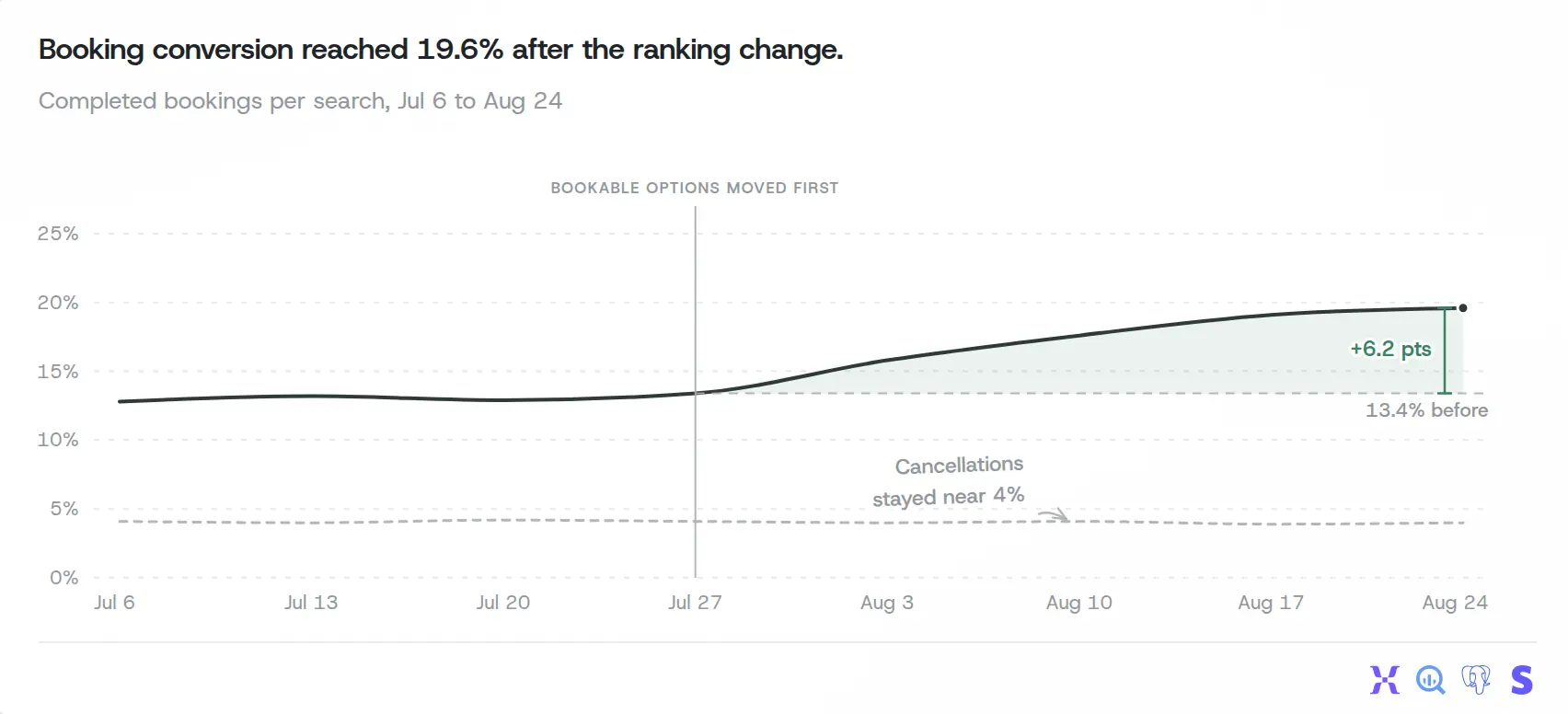
Refix is a revenue-obsessed AI product manager. Most tools here answer a question, run a schedule you set, or flag an anomaly. Refix decides what to investigate and follows it across sources. It reads product analytics (Amplitude, Mixpanel, PostHog, GA4) together with Stripe, warehouses, Zendesk and Shopify, so one investigation can follow a drop from the event data into billing and support. Give it a goal and it keeps working on it over days and weeks. Findings come as annotated charts like the one below.
A Refix chart, from refix.ai/features/charts. The title states the finding, the marker shows when the change shipped, and the note rules out a side effect. Example data.A 46-second demo: Refix flags a drop in Brazil renewals without being asked, answers a question in the thread, and follows up the next day. Watch on YouTube. Example data from a test workspace.
Best fit: consumer-facing businesses (apps, consumer websites, marketplaces and D2C brands) that want a revenue drop, a funnel change or a support spike noticed and investigated before anyone asks. Price: Pro is $150 per month for 150,000 credits, or $1,500 per year, and comes with a forward deployed PM, a Refix product manager who works alongside your team, per the [Refix pricing page](https://refix.ai/pricing). The 14-day trial includes 70,000 credits and needs a card. Slack is on every plan, alongside the Home web app and email.
Analytics and database access is read-only, actions in connected tools follow your approval settings, and Enterprise can self-host on your own Kubernetes cluster.
Not ideal if: you need governed metric definitions and dashboards, which is a BI tool's job, or your team works in Microsoft Teams, which is not supported yet.
Alternatives to consider: your analytics tool's own agent if every question lives there; ThoughtSpot Spotter if you need governed BI on a modeled warehouse.
A note on accuracy: in preliminary testing on DataAgentBench, Refix answered 48 of 54 questions correctly by our own review. That is not an official leaderboard score, and none of the other tools here were tested the same way ([how we counted](/blog/ai-data-agent-benchmark-dataagentbench/)).
## How do you choose an AI data analyst tool?
Start with where your data lives, then work through the other checks.
1. **Where the data lives.** Product events in Amplitude, Mixpanel, or PostHog point to that tool's own agent first. A modeled warehouse points to ThoughtSpot, Hex, Dot, Zenlytic, TextQL, or Querio. No warehouse points to Databox, Basedash, Polar, or Fabi.ai. Loose files point to Julius. Data spread across product, billing, and support points to a tool that reads all of them.
2. **Proactive or ask-only.** If your team knows what to look at, an ask-only bot is enough. If nobody has time to look, pick a tool that runs schedules, flags anomalies, or investigates on its own. Do not assume a "monitoring" feature means the tool explains why a metric moved.
3. **Slack bot or alerts.** A bot lets people ask follow-ups in a thread. Alerts only push a message. Check the plan, too: Hex and Databox put Slack on higher tiers, and Databricks Genie's bot is in Public Preview.
4. **A question you already know the answer to.** In a trial, ask for a number you have already checked, such as last month's revenue. If the tool gets it wrong, find out why before anyone relies on it.
5. **Seat, credit, or compute pricing.** ThoughtSpot, Hex, and Fabi.ai charge per seat or editor, which suits small groups of builders. PostHog and Snowflake charge per credit, and Databricks and TextQL add compute. Dot and Refix sell monthly plans that include credits, and Databox sells monthly tiers. Estimate your own usage before you compare headline prices.
For Slack agents that go beyond data work, such as knowledge search, support, and action-taking assistants, see [best Slack AI agents](/guides/best-slack-ai-agents/).
If your team asks its questions in Claude instead of Slack, see the [best Claude connectors for data analysis](/guides/best-claude-connectors-for-data-analysis/).